

CUE App on Roku: Here’s What You Need to Know
TL;DR Summary: This page is about the availability of the CUE Broadcast app on Roku, offering a wide range of content for a monthly fee. It highlights the features of CUE Broadcast, explains how to access and install the app on Roku, and provides troubleshooting tips. The post also mentions a referral program to get CUE for free and addresses common FAQs about the app and its compatibility with other devices.
How to Watch CUE on Roku
With the new Roku app, you can now access CUE Broadcast content directly on your Roku device—no need for external streaming sticks or casting from another device. This makes it even easier to enjoy live TV, movies, and sports right from your favorite big screen.
Get CUE Broadcast directly on Roku device. You can check it out here in the Roku Channel Store.

How to Find and Install the CUE Broadcast App on Roku
- On your Roku device, go to the Search option.
- Select the app and click Add Channel.
- Type in “CUE Broadcast”.
- Once installed, open the app and log in using your CUE Broadcast account credentials or Access Code.
Pro Tip: If you have trouble finding it directly on your device, you can add it from the Roku Channel Store online here.
What Is CUE Broadcast—and Why Are So Many People Making the Switch?
If you’re tired of juggling multiple streaming services or paying outrageous cable bills, CUE Broadcast is the all-in-one solution you’ve been waiting for. With one low monthly price, you get everything you love—live TV, blockbuster movies, hit series, and live sports—all without contracts or hidden fees.
Here’s What You Get with CUE Broadcast:
- 1,300+ Live TV Channels
Stay connected with local stations, breaking news, and live events. - 5,000+ On-Demand Movies
From Hollywood blockbusters to hidden gems, watch anytime. - 1,000+ TV Series
Binge your favorite shows without the endless subscription stacking. - Live Sports Coverage
Catch major sporting events without paying for expensive add-ons. - Works on 5 Devices Simultaneously
Watch at home or on the go—TV, phone, tablet, or laptop. - No Contracts, No Hidden Fees
Pay month-to-month and cancel anytime if you choose.
And the best part? It’s just $69.99 per month—that’s less than many people pay for cable alone. Read the CUE TV reviews for yourself and decide.
Want CUE on Roku for FREE? Here’s How!
With CUE’s “3 And It’s Free” program, you can completely eliminate your monthly subscription cost.
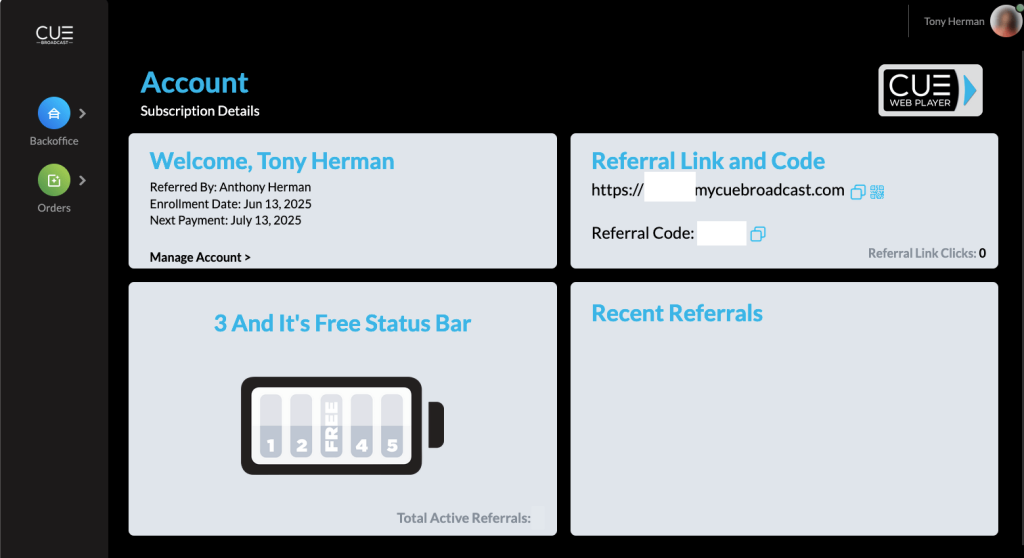
Simply refer 3 people who sign up, and your CUE Broadcast subscription is free every month those accounts stay active. It’s that easy—watch everything you love and never pay a dime!
Is It Working Perfectly?
I’ve tried it and it’s working well. There were a few times where the video sort of buffered, but the sound kept going. It wasn’t bad. Give it a try on your Roku TV and leave your comments here so others know what to expect.
Final Thoughts
This is a big step forward for CUE Broadcast, even if it’s a bit under the radar right now. As Roku support improves, it’s likely this app will become the easiest way to enjoy CUE’s full lineup of live TV, movies, and sports.
Have you tried it yet? Let me know in the comments if you got it working!
Having Trouble? Try These Troubleshooting Steps
If the CUE Broadcast Roku app isn’t working as expected, here are a few things you can try:
- Clear Roku Cache:
- From your Roku remote, press: Home (5x) > Up > Rewind (2x) > Fast Forward (2x)
- Your Roku will restart and clear temporary data.
- **Check for Roku System
CUE Broadcast Roku FAQs
Is CUE Broadcast now officially available on Roku?
Yes! CUE Broadcast has launched its app in the Roku Channel Store. You can add it directly from your Roku device or via this link.
I installed the app, but it’s not working—what should I do?
Try the following:
- Clear your Roku cache (use the secret remote sequence).
- Make sure your Roku software is fully updated.
- Log in using your 12-digit Access Code instead of email.
- Uninstall and reinstall the app if needed. If the issue persists, you may need to wait for further app updates as CUE continues to improve Roku support.
How do I find my 12-digit Access Code for logging in?
Log into your CUE Back Office, go to My Account, and scroll down to find your unique Access Code. You can use this instead of your email and password when logging in on devices like Roku.
Does CUE Broadcast work on other devices?
Absolutely! You can also use CUE on Amazon Firestick, Apple TV, Android and iOS devices, Smart TVs, laptops, and through the web player at mycuebroadcast.online.
Can I really get CUE for free?
Yes! With the “3 And It’s Free” program, just refer 3 people who sign up for CUE Broadcast, and your subscription becomes free every month they stay active.
📄 Download a PDF of This Article




Installed CUE on ROKU (thanks to your instructions) and had no problems.
Put in user name and password and it came up and is playing great!!