How to Watch TV Without Being Tracked
Are you cutting the cord not just for price, but for privacy?
If you’re using DuckDuckGo, you probably care about who’s tracking your data — and when it comes to streaming, a lot of platforms gather more than you’d like. Here’s how to watch movies, live TV, and sports without handing over your digital life.
The Problem With Mainstream Streaming Services
Netflix. Hulu. YouTube TV. All of them track what you watch, when, and how often — and sometimes, they share that info with third parties.
You’re not just streaming. You’re giving away habits, preferences, and location data. Some services even build advertiser profiles based on what you watch.
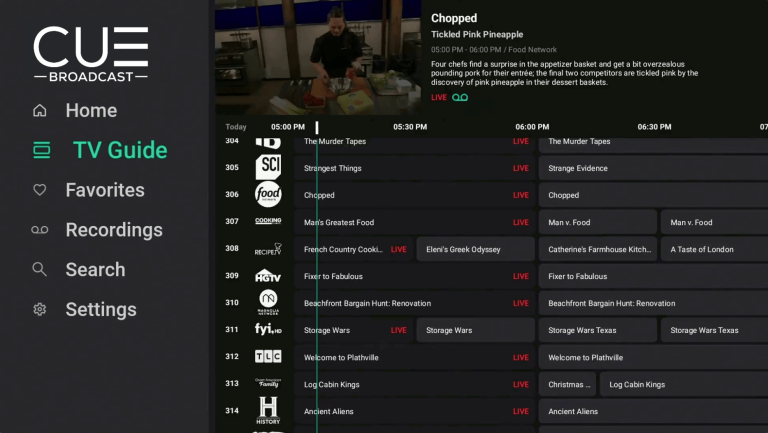
A Privacy-Friendly Streaming Option: CUE Broadcast
One alternative is CUE Broadcast — a private-label TV platform that:
- Doesn’t require a smart TV login or invasive app permissions
- Offers live TV, movies, and sports from a wide range of channels
- Works on up to five devices (even while traveling)
- Keeps your viewing activity private
You can also earn free access through referrals — no need to hand over more money just to watch basic TV.
Additional Tips for Private Streaming
- Use a VPN: Encrypt your traffic so your ISP (or anyone else) can’t snoop.
- Avoid smart TV logins: Stream through a laptop or external device if you can.
- Turn off ad tracking on your streaming device (Roku, Fire TV, etc.)
- Don’t sign in with Google, Facebook, or Apple — create standalone accounts.
FAQs About Smart TV Privacy
How do I turn off tracking on my smart TV?
Every brand is different, but look under “Settings” → “Privacy” or “Terms & Policies.” Disable features like “Viewing Information Services” (LG), “Viewing Data” (Samsung), or “Acr Services” (Vizio).
How do I make my smart TV private?
Turn off tracking, limit ad personalization, use a VPN, and consider using a streaming device (like Roku or Fire Stick) that’s easier to control than the TV’s built-in system.
How do I turn off tracking without them knowing?
You can disable many tracking features in settings, but your internet traffic may still be monitored. Use a VPN or private DNS to block tracking at the network level.
How do they know what I am watching on TV?
Smart TVs use a technology called ACR (Automatic Content Recognition) to scan your screen and report what you’re watching—even if it’s from a DVD or over-the-air antenna.
Want to Stay Private? Stick to These Principles
- Pay for services that respect privacy. Free often means you’re the product.
- Use browsers like Brave or Firefox when logging in.
- Avoid browser extensions that inject ads or affiliate links.
- Audit your streaming devices. Disable data sharing in settings.
Final Thoughts
Cord cutting is about freedom — from price, and from being tracked. With a little effort, you can stream TV on your own terms.
If you’re still wondering how do you stop your TV from tracking you, the answer starts with adjusting your smart TV’s privacy settings and using streaming alternatives that respect your data. Taking control of how you watch isn’t just about saving money—it’s about protecting your privacy, too.
DuckDuckGo users already know how to search privately. Now, watch privately too.
📄 Download a PDF of This Article